
Markets and seller signals
Which markets and towns you can search, and the four seller signals on every lead.
1Choose your market
On Search, open the Place box at the top to see every market and town you can search, and pick the whole market or a single town. The Coverage page on the website shows live counts by signal.
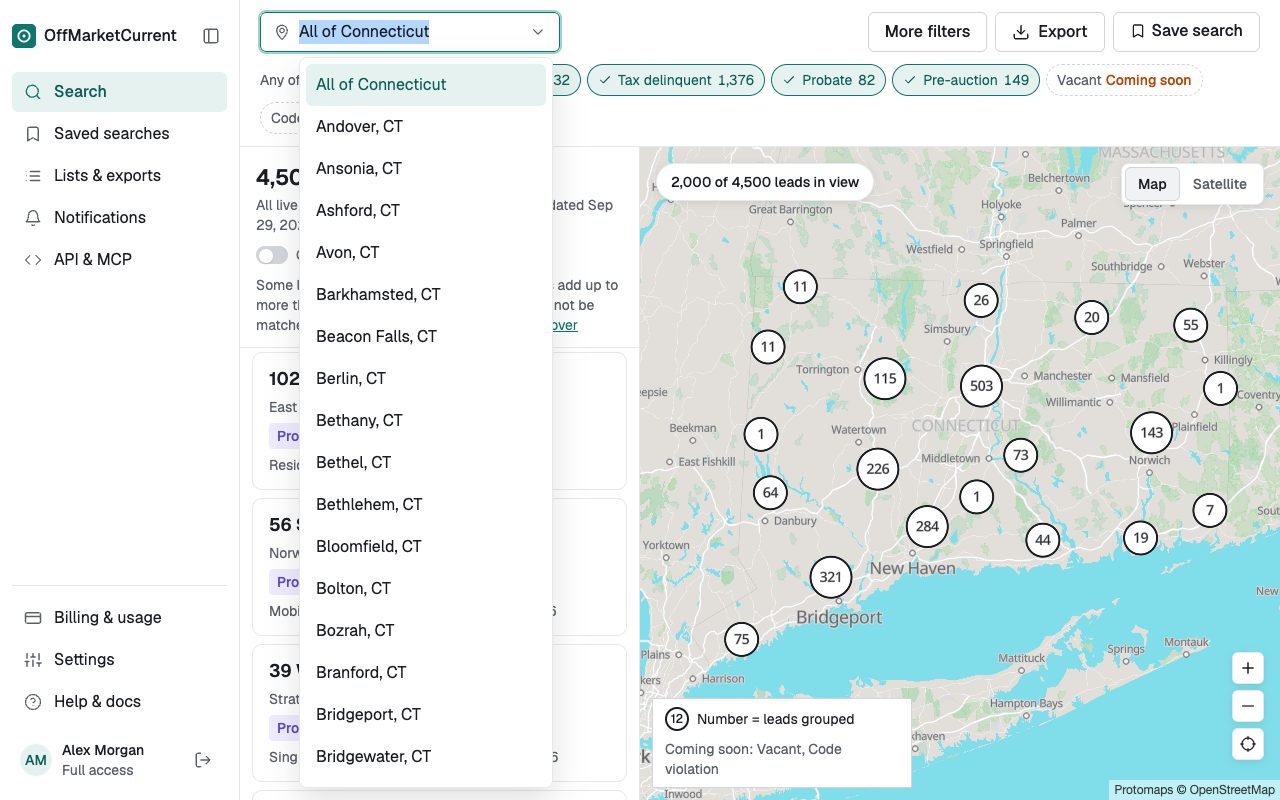
Screenshot: Search: the Place box lists the whole market and every town 2Find live signals
Search covers four seller signals: Pre-foreclosure, Tax delinquent, Probate, and Pre-auction. The signal row under the Place box shows one button for each, with its lead count, and all four start on.

Screenshot: Search: the four live signals with their lead counts 3Combine signals
Turn signals on or off to focus the list. A lead can carry two signals, such as Tax delinquent and Pre-auction, so the signal counts can add up to more than the total.
4Read the evidence for each signal
Open a lead and read “Seller-intent evidence”. Tax delinquent shows “Property tax unpaid” with the amount due and the year of the open bill. Pre-foreclosure shows “Foreclosure case filed” with the docket and status. Pre-auction shows “Foreclosure auction scheduled” with the sale date and time. Probate shows “Probate estate opened” with the court and case number. Each entry links to its source.
5Check data freshness
Counts come from the current data snapshot. The line under the results heading shows the total lead count for your market and the date the data was last updated.
Each lead shows the owner of record and mailing address from the town assessor.
Still stuck?
A person can look at your account.